 Calculator

|
|
Select the Calculator icon on the Main Desktop and press <Enter>. The Calculator screen will appear (see Fig.1.)
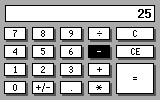
Figure 1. Calculator screen
| Key | Operation |
| <Del>, <-> | - |
| <Ins>, <+> | + |
| <Tab>, </> | / |
| <Select>, <*> | * |
| <Enter>, <=> | = |
| <C>, <Esc> | C |
| <Shift>, <C> | CE |
| <Fn><Select> | +/- |
| <Shift><Del> | Deletion of the last typed character |
| <Menu>, <Fn><Enter> | Open the context menu |
| <F1> | Open the task menu |
| <Esc> pressed twice | Exit |